Loading...
Loading...
Loading...
Loading...
Loading...
Loading...
Loading...
Loading...
Loading...
Loading...
Loading...
Loading...
Loading...
Loading...
Loading...
Loading...
Loading...
Loading...
This is found under the System menu in the navigation on the left. Settings is a tabbed page listing 10+ options control panels. This includes all the core settings, but is also open to module developers, to inject their own settings.
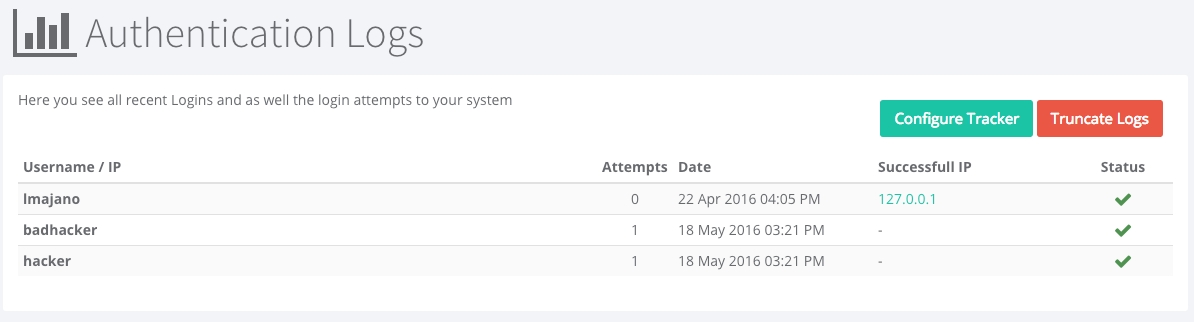
The ContentBox administrator module now comes with a login tracker which if enabled can track invalid logins and be able to block individual ip addresses from brute-force attempts. We even track all valid logins into the new ContentBox Security Audit Log.
You can click the Configure Tracker button from the Auth Logs screen, or click on System > Settings > Security Options
On this menu you will have the following options to change:
Site Name: This is the global name of this ContentBox website. This is the name that will display in the browser and what will normally show up in search engines. In the default Theme, this is the Header for the site ( unless you select a logo image ).
Site Tag Line: This is a slogan, motto, your USP Unique Selling Proposition, or short catchy 10 second elevator pitch. This is commonly used as a Alt tag for Logos by themes, each theme varies.
Site Description: The description of the site, also used in HTML description meta tag. This will also appear in the search engine results under the name. You can override this in blog posts, pages, and in modules.
Site Keywords: A comma delimited list of keywords to be used in the HTML keywords meta tags. This helps the search engine identify what your site contains. You can override this in blog posts, pages, and in modules.
Home Page Displays: This enables you to choose the latest blog entries page or an existing ContentBox page to display as the homepage for the website.
Send ContentBox Identity Header: This allows you to enable or disable a Browser Header, to help tools and browsers to identify the software powering the website. This is hidden from users.
Settings Cache Provider: Choose the CacheBox provider to cache global site settings into.
Disable Blog: You can disable the Blog for the entire ContentBox website. This does not delete data, it just disables blog features... including the addition of a Menu Item called Blog if you are using the default page navigation.
Note: If you disable the blog, remember to change the Home Page Display above to a real page and not the blog listing if you are disabling the blog.
Blog Entry Point: Choose the entry point in the URL to trigger the blog engine. The usual defautl entry point pattern is blog. Do not use symbols or slashes (/ )
Site Maintenance: You can put your entire site in maintenance mode if you are doing upgrades. This will make it easier to work on major changes to the site without customers seeing half completed work. The site will display a Offline Message, set in the Offline Message field, unless the Theme has a custom Maintenance Layout or Maintenance View.
Offline Message: The message to show users once the site is in maintenance mode, HTML is ok.
If you are logged in, with the MAINTENANCE_MODE_VIEWER permission, you will be able to view the site even when the site is in Maintenance Mode. When the site is in Maintenance Mode, you will see a Red Maintenance banner, to remind you the site is in Maintenance for other users.
In this settings pane, you can control global settings related to two-factor authentication.
Turning this flag on will require two-factor authentication for your app. Any users who have not enrolled will be required to enroll on their next login. Keep in mind that if you as an admin are not enrolled in two-factor and this setting is turned on you will be forced to enroll in two factor after saving this configuration.
The number of days to keep trusting a user's device. If you set this value to 0, two factor authentication will be required on every log in.
Two factor authentication uses a provider system to allow new methods of two factor authentication to be provided via a module. A good example of this extension is .
Note that if you decide to change the default two factor provider, all currently enrolled users will be unenrolled.
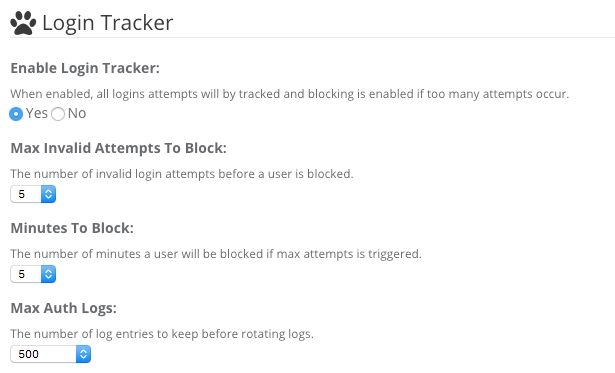
In System > Settings > Security Options - You will see 3 new features to ContentBox ( released in ContentBox 3.0 ), the Login Tracker, the Rate Limiter, and Secure Sockets Layer ( SSL ) Encryption.
The ContentBox administrator module now comes with a login tracker which if enabled can track invalid logins and be able to block individual ip addresses from brute-force attempts. We even track all valid logins into the new ContentBox Security Audit Log.
One of the biggest problems on the internet today, is out and out traffic overload. Of course, hardened hardware is the best approach to stop denial of service attacks, but we have given you some tools inside of ContentBox to help at the software level. You can now run your very own Rate Limiter.
SSL support can now be found everywhere in ContentBox for both the UI and admin modules. Users can even select specific pages for users to transition into or out of SSL for richer eCommerce or secure experiences.
Security is a big issue with any website these days, and with the number of WordPress hacks in the wild, it’s a big PRO to using ContentBox. With Brute force attacks to admins so prominent, we have a few features to make your life easier, and your website safer.
One of the major upgrades in ContentBox 3.0, ContentBox now offers BCrypt support for password encryption, to make cracking passwords harder than ever. The default algorithm for passwords is now based on BCrypt with work factors for better security and entropy. You can read more on bcrypt here:
A new password policy is now in place for ContentBox for new and current users, which must be greater than 8 characters with at least one:
Lower case character
Upper case character
Digit
Special character
All of these features are definitely great addons to ContentBox, but one of the best features of all...you can completely remove the Admin itself from your production site. This would give hackers no access to the login page at all.
Secure your site today.
This interface will allow you to configure the mail server details that ContentBox will use for sending email notifications
Site OptionsMail Server: This is the web address for the SMTP server. The address for the SMTP server may be an Internet address, such as mail.company.com, or the IP address of the mail server, such as 127.0.0.1.
If not specified, ContentBox will use the mail server address from the ColdFusion Administrator.
Mail Server Username: This is the username for the mail server, if necessary.
If not specified, ContentBox will use the username address from the ColdFusion Administrator.
Mail Server Password: This is the password for the mail server, if necessary.
If not specified, ContentBox will use the password from the ColdFusion Administrator.
Mail SMTP Port: This is the port number on which the mail server is running. This value will default to 25.
Use TLS: This enables/disables (default) the Transport Level Security (TLS) on the connection to the mail server.
Use SSL: This enables/disables (default) SSL encryption on the connection to the mail server.
After you have configured the mail server settings, you can click the Test Connection button to send a test email message to the email address associated with the current logged in user.
When running ContentBox in Development Mode:When running ContentBox in development mode, the mail server details are not utilized. Instead, all emails will be written to the file system logs for review. This prevents inadvertent emails from being sent during development.
The logs for every email sent will be located in:
[ContentBox Root Folder]\config\logs\mail


When you or your team log into your ContentBox site, you see your ContentBox Dashboard. You can see recent content, recent comments, recent news, some data snapshots… but you can also quickly customize this to help your team communicate. It is as easy as changing a few ContentBox admin settings.
Click on System > Settings and then click on Admin Options.
You can change the Title / Welcome that shows up on the dashboard.
You can update the Dashboard message, so when everyone logs in, they're reminded of some of your rules, regulations, or maybe a holiday message. As seen above:
One of the nice touches I think, is you can update the NEWS RSS feed. This allows you to add some humor to your day, by adding something like Dilbert's RSS feed… or maybe you can use an aggregator to follow what is happening in the CFML world, or maybe some blogs which you need to read and then update your audience.
You can set the number of items to show up in your dashboard, by type. Set the number for each of the following:
News Feed Count
Recent Entries Count
Recent Pages Count
Recent Content Store Count
These default to 10 when first installing ContentBox
You also have control of your Website paging, on the front end, for blog posts, as well as content in the back end of your website.
'Welcome to the Dark Side - The Admin'Recent Comments Count
Recent Logins Count
Blog posts should be scheduled for daily at 7am PST to ensure better readability.
All Blog posts should be included with an image.
Images should be 800x200.
Ensure all posts have their own SEO content.
Geek Setting ( key )
Type
Default
Description
cb_active
boolean
true
cb_admin_quicksearch_max
numeric
5
cb_admin_ssl
boolean
false
cb_admin_theme
string
contentbox-default
cb_comments_captcha
boolean
true
cb_comments_enabled
boolean
true
cb_comments_maxDisplayChars
string
500
cb_comments_moderation
boolean
true
cb_comments_moderation_blacklist
string
(empty string)
cb_comments_moderation_blockedlist
string
(empty string)
cb_comments_moderation_expiration
string
30
cb_comments_moderation_notify
boolean
true
cb_comments_moderation_whitelist
boolean
true
cb_comments_notify
boolean
true
cb_comments_notifyemails
string
(empty string)
cb_comments_urltranslations
boolean
true
cb_comments_whoisURL
string
http://whois.arin.net/ui/query.do?q
cb_content_bot_regex
string
Google|msnbot|Rambler|Yahoo|AbachoBOT|accoona|AcioRobot|ASPSeek|CocoCrawler|Dumbot|FAST-WebCrawler|GeonaBot|Gigabot|Lycos|MSRBOT|Scooter|AltaVista|IDBot|eStyle|Scrubby
cb_content_cacheName
string
Template
cb_content_caching
boolean
true
cb_content_cachingHeader
boolean
true
cb_content_cachingTimeout
string
60
cb_content_cachingTimeoutIdle
string
15
cb_content_hit_count
boolean
true
cb_content_hit_ignore_bots
boolean
false
cb_content_uiexport
boolean
true
cb_contentstore_caching
boolean
true
cb_dashboard_newsfeed
string
http://www.ortussolutions.com/blog/rss
cb_dashboard_newsfeed_count
string
5
cb_dashboard_recentComments
string
5
cb_dashboard_recentEntries
string
5
cb_dashboard_recentPages
string
5
cb_dashboard_recentcontentstore
string
5
cb_dashboard_welcome_body
string
(empty string)
cb_dashboard_welcome_title
string
Dashboard
cb_editors_default
string
ckeditor
cb_editors_markup
string
HTML
cb_entry_caching
boolean
true
cb_gravatar_display
boolean
true
cb_gravatar_rating
string
PG
cb_html_afterBodyStart
string
(empty string)
cb_html_afterContent
string
(empty string)
cb_html_afterFooter
string
(empty string)
cb_html_afterSideBar
string
(empty string)
cb_html_beforeBodyEnd
string
(empty string)
cb_html_beforeContent
string
(empty string)
cb_html_beforeHeadEnd
string
(empty string)
cb_html_beforeSideBar
string
(empty string)
cb_html_postArchivesDisplay
string
(empty string)
cb_html_postCommentForm
string
(empty string)
cb_html_postEntryDisplay
string
(empty string)
cb_html_postIndexDisplay
string
(empty string)
cb_html_postPageDisplay
string
(empty string)
cb_html_preArchivesDisplay
string
(empty string)
cb_html_preCommentForm
string
(empty string)
cb_html_preEntryDisplay
string
(empty string)
cb_html_preIndexDisplay
string
(empty string)
cb_html_prePageDisplay
string
(empty string)
cb_media_acceptMimeTypes
string
(empty string)
cb_media_allowDelete
boolean
true
cb_media_allowDownloads
boolean
true
cb_media_allowUploads
boolean
true
cb_media_createFolders
boolean
true
cb_media_directoryRoot
string
/contentbox/content
cb_media_html5uploads_maxFileSize
string
100
cb_media_html5uploads_maxFiles
string
25
cb_media_provider
string
CFContentMediaProvider
cb_media_provider_caching
boolean
true
cb_media_quickViewWidth
string
400
cb_notify_author
boolean
true
cb_notify_contentstore
boolean
true
cb_notify_entry
boolean
true
cb_notify_page
boolean
true
cb_page_excerpts
boolean
true
cb_paging_bandgap
string
5
cb_paging_maxRSSComments
string
10
cb_paging_maxentries
string
10
cb_paging_maxrows
string
20
cb_rss_cacheName
string
Template
cb_rss_caching
boolean
true
cb_rss_cachingTimeout
string
60
cb_rss_cachingTimeoutIdle
string
15
cb_rss_copyright
string
Ortus Solutions Corp (www.ortussolutions.com)
cb_rss_description
string
ContentBox RSS Feed
cb_rss_generator
string
ContentBox by Ortus Solutions
cb_rss_maxComments
string
10
cb_rss_maxEntries
string
10
cb_rss_title
string
RSS Feed by ContentBox
cb_rss_webmaster
string
(empty string)
cb_salt
string
10D182FA83578E7CEED20AE1CE4FEFC9240F6C1FEC9377D1EEE365E706B9124494E65338734BC29AB4FA5230A731EF3638B186CCB8AD7F63BE862123C301D5E8
cb_search_adapter
string
contentbox.models.search.DBSearch
cb_search_maxResults
string
20
cb_security_blocktime
string
5
cb_security_latest_logins
string
10
cb_security_login_blocker
boolean
true
cb_security_max_attempts
string
5
cb_security_max_auth_logs
string
500
cb_security_rate_limiter
boolean
true
cb_security_rate_limiter_bots_only
boolean
true
cb_security_rate_limiter_count
string
4
cb_security_rate_limiter_duration
string
1
cb_security_rate_limiter_message
string
"<p>You are making too many requests too fast please slow down and wait {duration} seconds</p>"
cb_site_adminbar
boolean
true
cb_site_blog_entrypoint
string
blog
cb_site_description
string
(empty string)
cb_site_disable_blog
boolean
false
cb_site_email
string
(entered during initial site setup)
cb_site_homepage
string
cbBlog
cb_site_keywords
string
(empty string)
cb_site_mail_password
string
(empty string)
cb_site_mail_server
string
(empty string)
cb_site_mail_smtp
string
25
cb_site_mail_ssl
boolean
false
cb_site_mail_tls
boolean
false
cb_site_mail_username
string
(empty string)
cb_site_maintenance
boolean
false
cb_site_maintenance_message
string
"<h1>This site is down for maintenance.<br /> Please check back again soon.</h1>"
cb_site_name
string
(entered during initial site setup)
cb_site_outgoingEmail
string
(entered during initial site setup)
cb_site_poweredby
boolean
true
cb_site_settings_cache
string
Template
cb_site_sitemap
boolean
true
cb_site_ssl
boolean
false
cb_site_tagline
string
(entered during initial site setup)
cb_site_theme
string
default
cb_theme_default_cbBootswatchTheme
string
green
cb_theme_default_cssStyleOverrides
string
(empty string)
cb_theme_default_footerBox
string
(empty string)
cb_theme_default_headerLogo
string
(empty string)
cb_theme_default_hpHeaderBg
string
green
cb_theme_default_hpHeaderBgPaddingBottom
string
50px
cb_theme_default_hpHeaderBgPaddingTop
string
100px
cb_theme_default_hpHeaderBgPos
string
Top Center
cb_theme_default_hpHeaderBtnStyle
string
primary
cb_theme_default_hpHeaderBtnText
string
(empty string)
cb_theme_default_hpHeaderImgBg
string
(empty string)
cb_theme_default_hpHeaderLink
string
(empty string)
cb_theme_default_hpHeaderText
string
(empty string)
cb_theme_default_hpHeaderTitle
string
(empty string)
cb_theme_default_overrideHeaderBGColor
string
(empty string)
cb_theme_default_overrideHeaderColors
boolean
false
cb_theme_default_overrideHeaderTextColor
string
(empty string)
cb_theme_default_rssDiscovery
boolean
true
cb_theme_default_showArchivesBlogSide
boolean
true
cb_theme_default_showCategoriesBlogSide
boolean
true
cb_theme_default_showEntriesSearchBlogSide
boolean
true
cb_theme_default_showEntryCommentsBlogSide
boolean
true
cb_theme_default_showRecentEntriesBlogSide
boolean
true
cb_theme_default_showSiteSearch
boolean
true
cb_theme_default_showSiteUpdatesBlogSide
boolean
true
cb_versions_commit_mandatory
boolean
false
cb_versions_max_history
string
(empty string)
cb_editors_ckeditor_excerpt_toolbar
JSON
[\r\n { \name\": \"document\" \"items\" : [ \"Source\",\"-\",\"Maximize\",\"ShowBlocks\" ] },\r\n { \"name\": \"basicstyles\", \"items\" : [ \"Bold\",\"Italic\",\"Underline\",\"Strike\",\"Subscript\",\"Superscript\"] },\r\n { \"name\": \"paragraph\", \"items\" : [ \"NumberedList\",\"BulletedList\",\"-\",\"Outdent\",\"Indent\",\"CreateDiv\"] },\r\n { \"name\": \"links\", \"items\" : [ \"Link\",\"Unlink\",\"Anchor\" ] },\r\n { \"name\": \"insert\", \"items\" : [ \"Image\",\"Flash\",\"Table\",\"HorizontalRule\",\"Smiley\",\"SpecialChar\" ] },\r\n { \"name\": \"contentbox\", \"items\" : [ \"MediaEmbed\",\"cbIpsumLorem\",\"cbWidgets\",\"cbContentStore\",\"cbLinks\",\"cbEntryLinks\" ] }\r\n]
cb_editors_ckeditor_extraplugins
string
cbKeyBindingcbWidgets,cbLinks,cbEntryLinks,cbContentStore,cbIpsumLorem,wsc,mediaembed,insertpre,justify,colorbutton,showblocks,find,div,smiley,specialchar,iframe
cb_editors_ckeditor_toolbar
JSON
[\r\n{ \name\": \"document\" \"items\" : [ \"Source\",\"-\",\"Maximize\",\"ShowBlocks\" ] },\r\n{ \"name\": \"clipboard\", \"items\" : [ \"Cut\",\"Copy\",\"Paste\",\"PasteText\",\"PasteFromWord\",\"-\",\"Undo\",\"Redo\" ] },\r\n{ \"name\": \"editing\", \"items\" : [ \"Find\",\"Replace\",\"SpellChecker\"] },\r\n{ \"name\": \"forms\", \"items\" : [ \"Form\", \"Checkbox\", \"Radio\", \"TextField\", \"Textarea\", \"Select\", \"Button\",\"HiddenField\" ] },\r\n\"/\",\r\n{ \"name\": \"basicstyles\", \"items\" : [ \"Bold\",\"Italic\",\"Underline\",\"Strike\",\"Subscript\",\"Superscript\",\"-\",\"RemoveFormat\" ] },\r\n{ \"name\": \"paragraph\", \"items\" : [ \"NumberedList\",\"BulletedList\",\"-\",\"Outdent\",\"Indent\",\"-\",\"Blockquote\",\"CreateDiv\",\"-\",\"JustifyLeft\",\"JustifyCenter\",\"JustifyRight\",\"JustifyBlock\",\"-\",\"BidiLtr\",\"BidiRtl\" ] },\r\n{ \"name\": \"links\", \"items\" : [ \"Link\",\"Unlink\",\"Anchor\" ] },\r\n\"/\",\r\n{ \"name\": \"styles\", \"items\" : [ \"Styles\",\"Format\" ] },\r\n{ \"name\": \"colors\", \"items\" : [ \"TextColor\",\"BGColor\" ] },\r\n{ \"name\": \"insert\", \"items\" : [ \"Image\",\"Table\",\"HorizontalRule\",\"Smiley\",\"SpecialChar\",\"Iframe\",\"InsertPre\"] },\r\n{ \"name\": \"contentbox\", \"items\" : [ \"MediaEmbed\",\"cbIpsumLorem\",\"cbWidgets\",\"cbContentStore\",\"cbLinks\",\"cbEntryLinks\" ] }\r\n]


